Troubleshooting and improving Invero's answers
This guide helps you understand why Invero might provide incorrect or incomplete answers and walks you through a systematic process to diagnose issues and enhance response quality. You'll learn how to identify the root causes of problematic answers and implement the most effective solutions to fix them.
Understanding how Invero generates answers
Invero is designed to be the most accurate system for answering technical questions based on your content. It uses a retrieval augmented generation (RAG) system that:
- Searches your knowledge base for relevant information
- Retrieves the most pertinent sources
- Generates answers based only on those sources
While Invero can provide impressive answers, it's important to set realistic expectations:
- Invero is intentionally limited to answering based only on your content, minimizing inaccuracies
- The quality of your documentation directly impacts Invero's performance
- Some limitations exist with retrieval-based systems, such as:
- Difficulty with time-sensitive questions (e.g., "What are the latest updates?")
- Challenges with analytics-based queries (e.g., "What are the most common errors?")
Step 1: Identify the root cause
When Invero provides an unsatisfactory response, the first step is to understand why this happened by examining the sources Invero used.
-
Locate the specific conversation:
- Go to the Invero platform
- Open Conversations and find the specific conversation
-
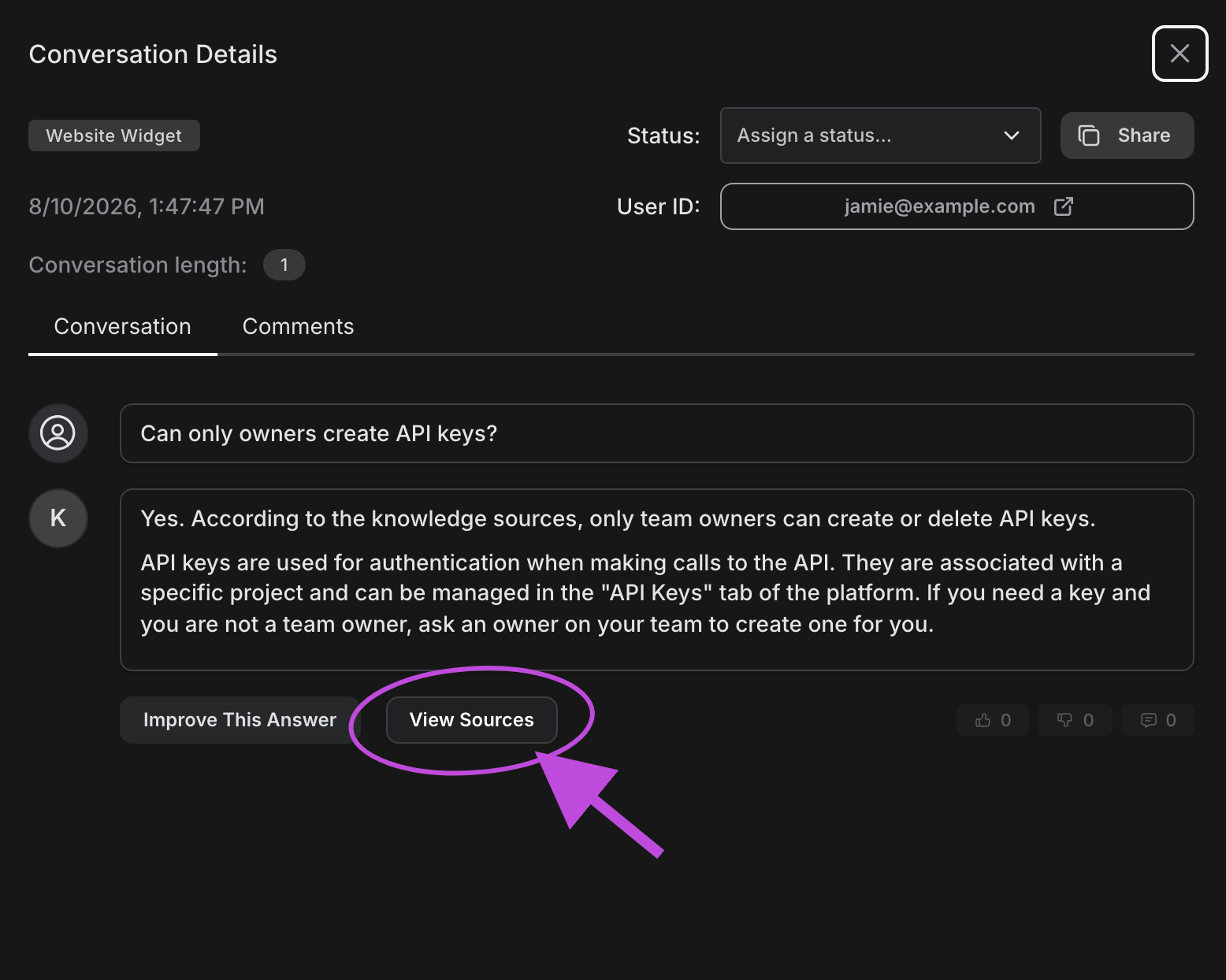
Analyze sources used in the reply:
-
Click "View Sources" to see the top sources Invero found
-
Look at the ones marked "Referenced" that Invero used to draft the answer
-
-
Identify the most likely cause:
- Missing information: Invero couldn't find relevant content in your knowledge base
- Incorrect information: Invero found and used outdated or inaccurate content
- Retrieval issues: Invero found related but not ideal content
- Interpretation problems: Invero retrieved good sources but misinterpreted them
Step 2: Improve your knowledge sources
In most cases, the best way to improve Invero's answers is to enhance your content. This is the most sustainable approach as it addresses the root cause rather than applying a targeted fix for a single question type. Here are effective strategies:
Add missing content
- Check if sources exist: Verify that the documents you'd expect Invero to use are in the
/Sourcestab - Add new sources: Upload documentation that contains the information needed to answer similar questions
- Create targeted content: Draft new documentation specifically addressing gaps identified through user questions
Remove confusing or outdated content
- Marketing content or blogs: These often contain non-technical language that can interfere with Invero's ability to provide precise answers
- Outdated information: Old documentation, support tickets, or GitHub issues can lead to incorrect answers
- Change logs or release notes: These can overload Invero with specific details that may not be relevant to most queries
Update existing content
- Improve clarity: Rewrite sections that may be ambiguous or overly complex
- Add missing details: Expand documentation to cover edge cases or common questions
- Restructure for better retrieval: Format content to help Invero better identify key information
One benefit of Invero is that it provides direct user feedback on the quality of your documentation, helping you identify areas for improvement and enhance your overall documentation strategy. Refer to the Analytics section for more details about the insights you can get with Invero.
Step 3: Use "Improve This Answer" for specific cases
Consider using the "Improve This Answer" feature in these scenarios:
- When you need a quick fix while source updates are in progress
- For edge cases that don't warrant changes to main documentation
- When handling unique questions that rarely occur but need accurate answers
- As a temporary solution while more comprehensive documentation is being developed
Here's how to use this feature:
The "Improve This Answer" feature effectively creates a new knowledge source for Invero. While useful for immediate fixes, remember that this doesn't address underlying issues in your primary knowledge sources.
Creating a correction
-
Open the conversation that needs improvement
-
Click the Improve This Answer button below the response
-
In the improvement modal:
- Review the original question and answer
- Replace the answer text with your improved version
- Check or uncheck "Could be answered with current knowledge" as appropriate
-
Click Submit to save your correction
Managing corrections
- Navigate to Sources in the Invero platform.
- Open the Corrected Responses source.
- Select the Answers tab.
- Find the correction you want to manage, then select Edit to change it or Delete to remove it.
Common troubleshooting scenarios
Here are specific issues you might encounter and how to address them effectively:
Broken links in answers
Issue: Invero includes broken links in answers, as it retrieves and presents information as-is without verifying link validity.
Resolution:
- Use "View Sources" to find the broken link
- Remove or update the link in your documentation
"Improve This Answer" not working
Issue: You've improved an answer, but Invero doesn't reflect the changes in subsequent responses.
Resolution:
- Ensure you've completed the review process after making improvements
- Verify the question is similar enough to trigger the correction
- Wait a few minutes for the knowledge index to update
Multiple product versions causing confusion
Issue: Managing multiple versions of your product or documentation in Invero can lead to duplication and reduced answer quality.
Resolution:
- Focus on using only the latest version of your documentation in Invero
- Clearly state the version number in document titles or descriptions
- If older versions must be included, consider creating separate Invero projects for each major version
For optimal performance, prioritize the most recent stable version in Invero and clearly indicate version information in your content.
Advanced debugging with the Invero team
If standard troubleshooting doesn't resolve your issues, reach out to the Invero team via your shared Slack channel or the support portal.
How to effectively report issues
When reporting an issue to the Invero team, include:
-
Share the conversation link:
- Go to the Invero platform and open Conversations
- Open the relevant conversation
- Click "Share" in the top right corner to copy the link
-
Explain the expected answer:
- Describe what Invero should have answered
- Specify which ingested content Invero should have referred to
The Invero team has additional advanced tools to help diagnose and fix complex issues.
Next steps
After implementing improvements to your content or using the "Improve This Answer" feature:
- Test similar questions to verify Invero now provides better answers
- Review related content that might benefit from similar improvements
- Use the Analytics dashboard to regularly monitor Invero's performance over time
Remember that improving Invero's answers is an iterative process that leads to continuously better documentation and user experiences.